Create a dockerfile/ex1
GitHub - Antoine-Flo/tuto-docker
Setup project
The Project setup is available here
Enter this code in
app.js
const express = require('express')
const app = express()
const port = 8080

app.get('/', (req, res) => {
  res.send('Hello World!')
})

# it expose port 8080 and log the info
app.listen(port, () => {
  console.log(`App listening port ${port}`)
})
From package.json, change "main" to "app.js"
Create Dockerfile
touch Dockerfile
touch .dockerignore
# ignore node_modules from our repository because it will be installed
# from our docker image
echo "node_modules" > .dockerignore
code Dockerfile
Put this code in Dockerfile :
FROM node:alpine

# Setup the working path (where all goes) inside the node image
WORKDIR /usr/src/app

# install package and install
COPY package*.json ./
RUN npm install && npm cache clean --force

# copy all the current files in the Image working dir
COPY . .

# CREATE THE PORT
EXPOSE 8080
# execute the process from the app
CMD [ "node", "app.js" ]
Build our Docker Image
# .  : build from current directory
# -t : create the image test-app from the folder efx
docker build . -t efx/test-app
Test our docker image
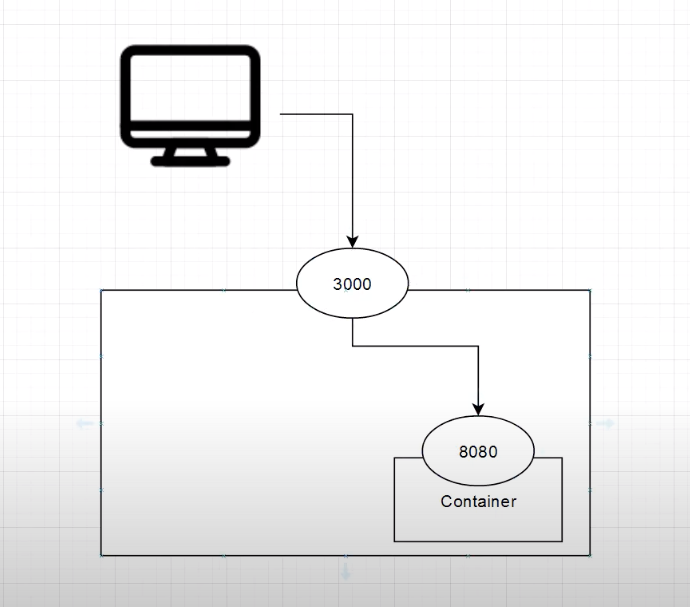
How the port work with Docker :
Docker Volume
#create a volume
$ docker volume create data

#show volume liste
$ docker volume ls
DRIVER   VOLUME NAME
local    data

#show volume info
$ docker volume inspect data

#exemple with postgres sync data on volume
$ docker run -v postgres-data:/var/lib/postgresql/datap postgres

#sync data an external volume on disk without docker volume
$ docker run --mount \
    type=bind,source=/home/exyzt/Documents,target=/var/lib/postgresql/data

Docker compose
#list all compose command available

$ docker compose console

#create the compose file

$ touch docker-compose.yml :

cat <<EOF > docker-compose.yml
services:
    app:
        build: .
        depends_on:
            - postgres
        environment:
            DATABASE_URL: postgres://user:pass@postgres:5432/db
        ports:
            - "3000:8080"

    postgres:
        # connect to database postgres @ localhost:5432
        # on pg_db Database with user: efx, pass: 1234
        image: postgres:alpine
         environment:
            POSTGRES_PASSWORD: 1234
            POSTGRES_DB: pg_db
            POSTGRES_USER: efx
    ports:
      - "5432:5432"
    volumes:
      - volumePgData:/var/lib/postgresql/data

volumes:
    volumePgData:
EOF

#Run our compose
$ docker-compose up
Compose commands
#Stop the container(s) using the following command:
docker-compose down

#Delete all containers using the following command:
docker rm -f $(docker ps -a -q)

#Delete all volumes using the following command:
docker volume rm $(docker volume ls -q)

#Restart the containers using the following command:
docker-compose up -d